
Monitoring serveurs et switches avec Prometheus, Grafana et Alertmanager
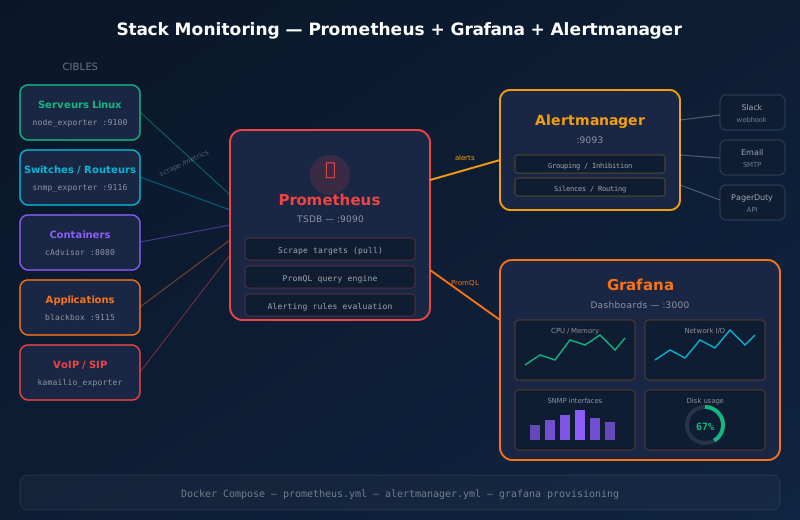
La supervision est le pilier de toute infrastructure fiable. Sans monitoring, vous découvrez les pannes… quand vos utilisateurs vous appellent. La stack Prometheus + Grafana + Alertmanager est devenue le standard open source pour le monitoring d'infrastructure, adoptée par les plus grands opérateurs et hébergeurs.
Ce guide détaille la mise en place complète avec Docker Compose.
Architecture de la stack
| Composant | Rôle | Port |
|---|---|---|
| Prometheus | Collecte et stockage des métriques (TSDB) | 9090 |
| Grafana | Visualisation, dashboards | 3000 |
| Alertmanager | Gestion et routage des alertes | 9093 |
| node_exporter | Métriques serveurs Linux (CPU, RAM, disque, réseau) | 9100 |
| snmp_exporter | Métriques switches/routeurs via SNMP | 9116 |
| blackbox_exporter | Probes HTTP, TCP, ICMP, DNS | 9115 |
| cAdvisor | Métriques containers Docker | 8080 |
Principe de fonctionnement
Prometheus fonctionne en mode pull : il interroge périodiquement (scrape) les /metrics exposés par chaque exporter. C'est l'inverse de Zabbix/Nagios qui fonctionnent en push. Ce modèle est plus simple à scaler et à sécuriser.
1. Prérequis
- Serveur Linux (Debian 12/13, Ubuntu 22.04+)
- Docker + Docker Compose installés
- Accès SNMP (community string) à vos switches/routeurs
- (Optionnel) Webhook Slack ou serveur SMTP pour les alertes
2. Structure du projet
monitoring/
├── docker-compose.yml
├── prometheus/
│   ├── prometheus.yml
│   ├── alert_rules.yml
│   └── targets/
│       ├── nodes.yml
│       └── switches.yml
├── alertmanager/
│   └── alertmanager.yml
├── grafana/
│   └── provisioning/
│       ├── datasources/
│       │   └── prometheus.yml
│       └── dashboards/
│           └── dashboard.yml
└── snmp/
    └── snmp.yml
3. Docker Compose
# docker-compose.yml
services:
  prometheus:
    image: prom/prometheus:latest
    container_name: prometheus
    restart: unless-stopped
    ports:
      - "9090:9090"
    volumes:
      - ./prometheus/prometheus.yml:/etc/prometheus/prometheus.yml:ro
      - ./prometheus/alert_rules.yml:/etc/prometheus/alert_rules.yml:ro
      - ./prometheus/targets:/etc/prometheus/targets:ro
      - prometheus_data:/prometheus
    command:
      - '--config.file=/etc/prometheus/prometheus.yml'
      - '--storage.tsdb.path=/prometheus'
      - '--storage.tsdb.retention.time=90d'
      - '--web.enable-lifecycle'

  alertmanager:
    image: prom/alertmanager:latest
    container_name: alertmanager
    restart: unless-stopped
    ports:
      - "9093:9093"
    volumes:
      - ./alertmanager/alertmanager.yml:/etc/alertmanager/alertmanager.yml:ro

  grafana:
    image: grafana/grafana:latest
    container_name: grafana
    restart: unless-stopped
    ports:
      - "3000:3000"
    environment:
      - GF_SECURITY_ADMIN_USER=admin
      - GF_SECURITY_ADMIN_PASSWORD=${GRAFANA_PASSWORD:-changeme}
      - GF_USERS_ALLOW_SIGN_UP=false
    volumes:
      - grafana_data:/var/lib/grafana
      - ./grafana/provisioning:/etc/grafana/provisioning:ro

  node-exporter:
    image: prom/node-exporter:latest
    container_name: node-exporter
    restart: unless-stopped
    ports:
      - "9100:9100"
    volumes:
      - /proc:/host/proc:ro
      - /sys:/host/sys:ro
      - /:/rootfs:ro
    command:
      - '--path.procfs=/host/proc'
      - '--path.rootfs=/rootfs'
      - '--path.sysfs=/host/sys'
      - '--collector.filesystem.mount-points-exclude=^/(sys|proc|dev|host|etc)($$|/)'

  snmp-exporter:
    image: prom/snmp-exporter:latest
    container_name: snmp-exporter
    restart: unless-stopped
    ports:
      - "9116:9116"
    volumes:
      - ./snmp/snmp.yml:/etc/snmp_exporter/snmp.yml:ro

  blackbox-exporter:
    image: prom/blackbox-exporter:latest
    container_name: blackbox-exporter
    restart: unless-stopped
    ports:
      - "9115:9115"

  cadvisor:
    image: gcr.io/cadvisor/cadvisor:latest
    container_name: cadvisor
    restart: unless-stopped
    ports:
      - "8080:8080"
    volumes:
      - /:/rootfs:ro
      - /var/run:/var/run:ro
      - /sys:/sys:ro
      - /var/lib/docker/:/var/lib/docker:ro

volumes:
  prometheus_data:
  grafana_data:
4. Configuration Prometheus
# prometheus/prometheus.yml
global:
  scrape_interval: 15s
  evaluation_interval: 15s

rule_files:
  - "alert_rules.yml"

alerting:
  alertmanagers:
    - static_configs:
        - targets:
            - alertmanager:9093

scrape_configs:
  # Prometheus lui-même
  - job_name: "prometheus"
    static_configs:
      - targets: ["localhost:9090"]

  # Serveurs Linux
  - job_name: "nodes"
    file_sd_configs:
      - files:
          - "/etc/prometheus/targets/nodes.yml"
        refresh_interval: 30s

  # Switches SNMP
  - job_name: "snmp"
    file_sd_configs:
      - files:
          - "/etc/prometheus/targets/switches.yml"
        refresh_interval: 30s
    metrics_path: /snmp
    params:
      module: [if_mib]
      auth: [public_v2]
    relabel_configs:
      - source_labels: [__address__]
        target_label: __param_target
      - source_labels: [__param_target]
        target_label: instance
      - target_label: __address__
        replacement: snmp-exporter:9116

  # Probes HTTP
  - job_name: "blackbox-http"
    metrics_path: /probe
    params:
      module: [http_2xx]
    static_configs:
      - targets:
          - https://www.technixis.com
          - https://gitlab.nettec.io
    relabel_configs:
      - source_labels: [__address__]
        target_label: __param_target
      - source_labels: [__param_target]
        target_label: instance
      - target_label: __address__
        replacement: blackbox-exporter:9115

  # Containers Docker
  - job_name: "cadvisor"
    static_configs:
      - targets: ["cadvisor:8080"]

  # Node exporter local
  - job_name: "node-local"
    static_configs:
      - targets: ["node-exporter:9100"]
Fichiers de cibles dynamiques
# prometheus/targets/nodes.yml
- targets:
    - "10.0.1.10:9100"
    - "10.0.1.11:9100"
    - "10.0.1.12:9100"
  labels:
    env: "production"
    site: "dc-montpellier"
# prometheus/targets/switches.yml
- targets:
    - "10.0.0.1"   # core-sw-01
    - "10.0.0.2"   # core-sw-02
    - "10.0.0.10"  # access-sw-01
    - "10.0.0.11"  # access-sw-02
  labels:
    env: "production"
    type: "switch"
5. Règles d'alertes
# prometheus/alert_rules.yml
groups:
  - name: infrastructure
    rules:
      # Serveur down
      - alert: NodeDown
        expr: up{job="nodes"} == 0
        for: 2m
        labels:
          severity: critical
        annotations:
          summary: "Serveur {{ $labels.instance }} down"
          description: "Le serveur {{ $labels.instance }} ne répond plus depuis 2 minutes."

      # CPU > 90%
      - alert: HighCpuUsage
        expr: 100 - (avg by(instance) (rate(node_cpu_seconds_total{mode="idle"}[5m])) * 100) > 90
        for: 5m
        labels:
          severity: warning
        annotations:
          summary: "CPU élevé sur {{ $labels.instance }}"
          description: "Utilisation CPU à {{ $value }}% depuis 5 minutes."

      # Mémoire > 90%
      - alert: HighMemoryUsage
        expr: (1 - node_memory_MemAvailable_bytes / node_memory_MemTotal_bytes) * 100 > 90
        for: 5m
        labels:
          severity: warning
        annotations:
          summary: "Mémoire élevée sur {{ $labels.instance }}"
          description: "Utilisation mémoire à {{ $value }}%."

      # Disque > 85%
      - alert: DiskSpaceLow
        expr: (1 - node_filesystem_avail_bytes{fstype!~"tmpfs|overlay"} / node_filesystem_size_bytes) * 100 > 85
        for: 10m
        labels:
          severity: warning
        annotations:
          summary: "Espace disque faible sur {{ $labels.instance }}"
          description: "Partition {{ $labels.mountpoint }} à {{ $value }}%."

      # Disque > 95% → critique
      - alert: DiskSpaceCritical
        expr: (1 - node_filesystem_avail_bytes{fstype!~"tmpfs|overlay"} / node_filesystem_size_bytes) * 100 > 95
        for: 5m
        labels:
          severity: critical
        annotations:
          summary: "CRITIQUE : disque plein sur {{ $labels.instance }}"
          description: "Partition {{ $labels.mountpoint }} à {{ $value }}% !"

  - name: network
    rules:
      # Switch down (SNMP)
      - alert: SwitchDown
        expr: up{job="snmp"} == 0
        for: 2m
        labels:
          severity: critical
        annotations:
          summary: "Switch {{ $labels.instance }} injoignable"
          description: "Pas de réponse SNMP depuis 2 minutes."

      # Interface down
      - alert: InterfaceDown
        expr: ifOperStatus == 2
        for: 1m
        labels:
          severity: warning
        annotations:
          summary: "Interface down sur {{ $labels.instance }}"
          description: "Interface {{ $labels.ifDescr }} est down."

      # Trafic élevé (> 800 Mbps sur interface 1G)
      - alert: HighBandwidth
        expr: rate(ifHCOutOctets[5m]) * 8 > 800000000
        for: 5m
        labels:
          severity: warning
        annotations:
          summary: "Bande passante élevée sur {{ $labels.instance }}"
          description: "Interface {{ $labels.ifDescr }} : {{ $value | humanize }}bps."

  - name: services
    rules:
      # Site web down
      - alert: WebsiteDown
        expr: probe_success{job="blackbox-http"} == 0
        for: 2m
        labels:
          severity: critical
        annotations:
          summary: "Site {{ $labels.instance }} inaccessible"
          description: "Probe HTTP échoue depuis 2 minutes."

      # Certificat SSL expire dans < 15 jours
      - alert: SSLCertExpiringSoon
        expr: probe_ssl_earliest_cert_expiry - time() < 86400 * 15
        for: 1h
        labels:
          severity: warning
        annotations:
          summary: "Certificat SSL expire bientôt sur {{ $labels.instance }}"
          description: "Le certificat expire dans {{ $value | humanizeDuration }}."
6. Configuration Alertmanager
# alertmanager/alertmanager.yml
global:
  resolve_timeout: 5m
  smtp_smarthost: 'smtp.example.com:587'
  smtp_from: 'alertmanager@technixis.com'
  smtp_auth_username: 'alertmanager@technixis.com'
  smtp_auth_password: 'votre-mot-de-passe'
  smtp_require_tls: true

route:
  group_by: ['alertname', 'severity']
  group_wait: 30s
  group_interval: 5m
  repeat_interval: 4h
  receiver: 'default'

  routes:
    # Critiques → Slack + email immédiat
    - match:
        severity: critical
      receiver: 'critical'
      group_wait: 10s
      repeat_interval: 1h

    # Warnings → email groupé
    - match:
        severity: warning
      receiver: 'warning'
      group_wait: 5m

receivers:
  - name: 'default'
    email_configs:
      - to: 'noc@technixis.com'

  - name: 'critical'
    slack_configs:
      - api_url: 'https://hooks.slack.com/services/XXXX/YYYY/ZZZZ'
        channel: '#alertes-critiques'
        title: '🚨 {{ .GroupLabels.alertname }}'
        text: '{{ range .Alerts }}{{ .Annotations.summary }}\n{{ end }}'
        send_resolved: true
    email_configs:
      - to: 'noc@technixis.com'
        send_resolved: true

  - name: 'warning'
    email_configs:
      - to: 'noc@technixis.com'

inhibit_rules:
  # Si un serveur est down, supprimer les alertes de service
  - source_match:
      alertname: 'NodeDown'
    target_match_re:
      alertname: 'HighCpuUsage|HighMemoryUsage|DiskSpace.*'
    equal: ['instance']
7. Provisioning Grafana
# grafana/provisioning/datasources/prometheus.yml
apiVersion: 1
datasources:
  - name: Prometheus
    type: prometheus
    access: proxy
    url: http://prometheus:9090
    isDefault: true
    editable: false
8. Déploiement
# Créer la structure
mkdir -p monitoring/{prometheus/targets,alertmanager,grafana/provisioning/{datasources,dashboards},snmp}

# Copier les fichiers de config (voir sections ci-dessus)

# Lancer la stack
cd monitoring
docker compose up -d

# Vérifier
docker compose ps
docker compose logs -f prometheus
9. Installer node_exporter sur les serveurs distants
Sur chaque serveur Linux à superviser :
# Télécharger node_exporter
wget https://github.com/prometheus/node_exporter/releases/download/v1.8.2/node_exporter-1.8.2.linux-amd64.tar.gz
tar xzf node_exporter-*.tar.gz
mv node_exporter-*/node_exporter /usr/local/bin/

# Service systemd
cat > /etc/systemd/system/node-exporter.service << 'EOF'
[Unit]
Description=Node Exporter
After=network.target

[Service]
User=nobody
ExecStart=/usr/local/bin/node_exporter
Restart=always

[Install]
WantedBy=multi-user.target
EOF

systemctl daemon-reload
systemctl enable --now node-exporter

# Vérifier
curl -s http://localhost:9100/metrics | head
10. Configurer SNMP sur les switches
Cisco IOS
snmp-server community technixis-ro RO
snmp-server location DC-Montpellier
snmp-server contact noc@technixis.com
Arista EOS
snmp-server community technixis-ro ro
snmp-server host 10.0.1.100 version 2c technixis-ro
MikroTik RouterOS
/snmp set enabled=yes
/snmp community set [ find default=yes ] name=technixis-ro read-access=yes
11. Dashboards Grafana recommandés
Importez ces dashboards depuis grafana.com/grafana/dashboards :
| ID | Dashboard | Usage |
|---|---|---|
| 1860 | Node Exporter Full | Métriques serveurs Linux complètes |
| 11074 | Node Exporter for Prometheus | Vue synthétique serveurs |
| 14857 | SNMP Interface | Trafic interfaces switches |
| 893 | Docker and system monitoring | Containers + host |
| 7587 | Prometheus Blackbox Exporter | Probes HTTP/TCP |
| 3662 | Prometheus Alertmanager | État des alertes |
12. Requêtes PromQL utiles
# CPU moyen par serveur (5 min)
100 - avg by(instance) (rate(node_cpu_seconds_total{mode="idle"}[5m])) * 100

# Mémoire utilisée en %
(1 - node_memory_MemAvailable_bytes / node_memory_MemTotal_bytes) * 100

# Trafic réseau entrant (bits/s)
rate(node_network_receive_bytes_total{device!="lo"}[5m]) * 8

# Espace disque libre
node_filesystem_avail_bytes{fstype!~"tmpfs|overlay"} / 1024 / 1024 / 1024

# Trafic interface switch (bps)
rate(ifHCOutOctets{ifDescr="GigabitEthernet0/1"}[5m]) * 8

# Latence probe HTTP (ms)
probe_duration_seconds{job="blackbox-http"} * 1000

# Uptime serveur
time() - node_boot_time_seconds
Conclusion
La stack Prometheus + Grafana + Alertmanager offre une solution de monitoring complète, scalable et gratuite. Avec les bons exporters et dashboards, vous supervisez l'ensemble de votre infrastructure : serveurs, switches, services web et containers.
Chez Technixis, nous déployons et maintenons cette stack pour des opérateurs et des entreprises. Besoin de mettre en place votre monitoring ? Contactez-nous ou appelez le 0800 012 013.
Liens & sources open source :
- Prometheus — Site officiel
- Grafana — Site officiel
- Alertmanager — GitHub
- node_exporter — GitHub
- snmp_exporter — GitHub
- cAdvisor — GitHub
- blackbox_exporter — GitHub
Laisser un commentaire